meta data for this page
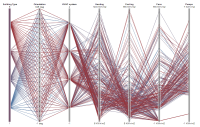
Parallel Coordinates Plot Example
Here is an example of what a Parallel Coordinates Plot looks like with building simulation data. You can try filtering data by selecting a region on a coordinate. This plot type is excellent for visually analyzing sensitive design parameters to given performance indicators.
Sample chart
(If the chart below does not show, please reload this page.)
<html>
<head> <title>Parallel Coordinates</title> <script type="text/javascript" src="/vis/pcp/protovis.js"></script> <script type="text/javascript" src="/vis/pcp/data.js"></script> <style type="text/css">
#fig {
width: 880px; height: 560px;
}
#title {
position: absolute; top: 70px; left: 200px; padding: 10px; background: white;
}
large {
font-size: medium;
}
</style> </head> <body><div id="center"><div id="fig"> <script type="text/javascript+protovis">
var dims = pv.keys(units);
/* Sizing and scales. */ var w = 820,
h = 520,
fudge = 0.5,
x = pv.Scale.ordinal(dims).splitFlush(0, w),
y = pv.dict(dims, function(t) pv.Scale.linear(
cars.filter(function(d) !isNaN(d[t])),
function(d) Math.floor(d[t])-fudge,
function(d) Math.ceil(d[t]) +fudge
).range(0, h)),
c = pv.dict(dims, function(t) pv.Scale.linear(
cars.filter(function(d) !isNaN(d[t])),
function(d) Math.floor(d[t])-fudge,
function(d) Math.ceil(d[t]) +fudge
).range("steelblue", "brown"));
/* Interaction state. */ var filter = pv.dict(dims, function(t) {
return {min: y[t].domain()[0], max: y[t].domain()[1]};
}), active = "model";
/* The root panel. */ var vis = new pv.Panel()
.width(w) .height(h) .left(30) .right(30) .top(30) .bottom(20);
The parallel coordinates display. vis.add(pv.Panel) .data(cars) .visible(function(d) dims.every(function(t) (d[t] >= filter[t].min) && (d[t] ⇐ filter[t].max))) .add(pv.Line) .data(dims) .left(function(t, d) x(t)) .bottom(function(t, d) y[t](d[t])) .strokeStyle(“#ddd”) .lineWidth(1) .antialias(false); Rule per dimension. rule = vis.add(pv.Rule)
.data(dims) .left(x);
Dimension label rule.anchor(“top”).add(pv.Label) .top(-12) .font(“bold 10px sans-serif”) .text(function(d) units[d].name); The parallel coordinates display. var change = vis.add(pv.Panel);
var line = change.add(pv.Panel)
.data(cars)
.visible(function(d) dims.every(function(t)
(d[t] >= filter[t].min) && (d[t] <= filter[t].max)))
.add(pv.Line)
.data(dims)
.left(function(t, d) x(t))
.bottom(function(t, d) y[t](d[t]))
.strokeStyle(function(t, d) c[active](d[active]))
.lineWidth(1);
Updater for slider and resizer. function update(d) { var t = d.dim; filter[t].min = Math.max(y[t].domain()[0], y[t].invert(h - d.y - d.dy)); filter[t].max = Math.min(y[t].domain()[1], y[t].invert(h - d.y)); active = t; change.render(); return false; } Updater for slider and resizer. function selectAll(d) {
if (d.dy < 3) {
var t = d.dim;
filter[t].min = Math.max(y[t].domain()[0], y[t].invert(0));
filter[t].max = Math.min(y[t].domain()[1], y[t].invert(h));
d.y = 0; d.dy = h;
active = t;
change.render();
}
return false;
}
/* Handle select and drag */ var handle = change.add(pv.Panel)
.data(dims.map(function(dim) { return {y:0, dy:h, dim:dim}; }))
.left(function(t) x(t.dim) - 30)
.width(60)
.fillStyle("rgba(0,0,0,.001)")
.cursor("crosshair")
.event("mousedown", pv.Behavior.select())
.event("select", update)
.event("selectend", selectAll)
.add(pv.Bar)
.left(25)
.top(function(d) d.y)
.width(10)
.height(function(d) d.dy)
.fillStyle(function(t) t.dim == active
? c[t.dim]((filter[t.dim].max + filter[t.dim].min) / 2)
: "hsla(0,0,50%,.5)")
.strokeStyle("white")
.cursor("move")
.event("mousedown", pv.Behavior.drag())
.event("dragstart", update)
.event("drag", update);
handle.anchor(“bottom”).add(pv.Label)
.textBaseline("top")
.text(function(d) filter[d.dim].min.toFixed(0) + units[d.dim].unit);
handle.anchor(“top”).add(pv.Label)
.textBaseline("bottom")
.text(function(d) filter[d.dim].max.toFixed(0) + units[d.dim].unit);
vis.render();
</script> </div></div></body>
</html>

Discussion